After “how much does a website cost?”, the question I get asked most is “and what about an online store?”. The short answer is “it depends” again, but with a store that “it depends” carries even more weight, because beyond development there are costs that keep coming every month: hosting, payment gateway fees, licenses and maintenance.
In this article I explain, with prices in USD for Ecuador and Latin America, how much a WooCommerce store costs, what pushes the quote up or down, and which expenses are worth planning for from day one. If you are still comparing it with a business website, I recommend reading how much a WordPress website costs first.
The short answer: ballpark ranges
The WooCommerce stores I build as a freelancer start at $2,250, and most projects fall between $2,250 and $7,200+, with a typical timeline of 6 to 12 weeks. A large agency will usually charge more for a similar scope.
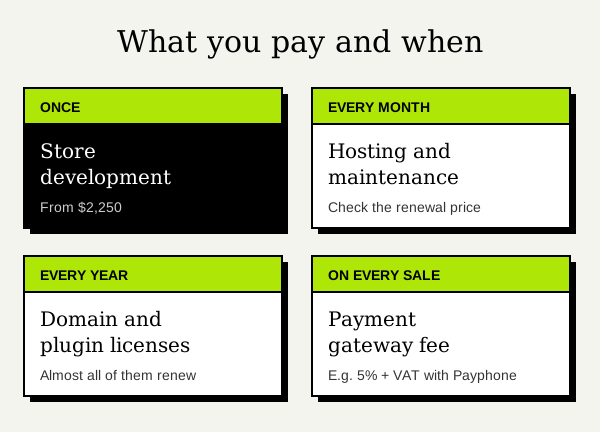
But development is only one part. This table sums up everything you will pay for:
| Item | What it costs | How often |
|---|---|---|
| Store development | From $2,250 (usually $2,250 – $7,200+) | Once |
| Domain | Around $11 – $20 for a .com; a .ec usually costs $35 – $120, depending on the registrar | Yearly |
| Hosting | From a few dollars a month on a promotion; check the renewal price | Monthly or yearly |
| Payment gateway | A fee on every sale (for example, 5% + VAT with Payphone) | Per transaction |
| Paid plugins | From $0 to a few hundred dollars a year, depending on what you need | Yearly, in most cases |
| Maintenance | Around $40 – $150, depending on the size of the store and the hours included | Monthly |
Treat it as a starting point for planning, not a fixed price list.
What pushes the quote up or down
The catalog
This is the biggest factor. Selling 15 products with no variations is not the same as selling 800 with sizes and colors. A large catalog needs a solid structure of categories, attributes and filters so customers can find what they are looking for.
Custom design or a theme
Just like with a business website, a well-adapted theme is faster to build. A custom design for the home page, categories, product pages and checkout takes more hours, but the store ends up designed around the way you sell, not anyone’s.
Payments, shipping and taxes
Setting up a payment gateway, shipping zones and rates, VAT and the store emails is part of the project. Selling only in your city is simple; shipping nationwide with different rates or abroad takes more setup and testing.
Integrations
Connecting the store to your e-invoicing system, your inventory, a shipping service or your email marketing tool adds development.
Product upload and content
If you provide the products ready to go (photos, descriptions, prices and variations), the quote focuses on design and development. If descriptions need to be written, photos edited or hundreds of products uploaded by hand, that is extra work and it should be in the quote.
Payment gateways in Ecuador: Payphone, Datafast and Kushki
Many pricing articles talk about Stripe or PayPal, but in Ecuador the usual choice is a local gateway. The three best-known ones integrate with WooCommerce:
- Payphone. It has an official plugin you can install from the WordPress plugin directory. It accepts Visa, Mastercard, Diners, Discover and Payphone balance. According to its website, there is no setup or monthly fee, just a 5% + VAT fee on each charge, and the money goes to your Payphone Business account. It is the quickest option to get started.
- Datafast. Its payment button (Dataweb) has a WooCommerce plugin you download from its developer portal. To sign up they ask for a RUC or RISE, a copy of your ID and a bank account, and Datafast certifies the integration before it goes live. It is worth confirming with them that the plugin version works with your WooCommerce version, because their published documentation mentions older versions.
- Kushki. It maintains an official WooCommerce plugin that supports card payments, refunds and test mode, and it even has fields designed for Ecuadorian taxes.
Which one should you choose? It depends on your sales volume, the fees you are offered and whether you already work with a bank or acquirer. Datafast and Kushki fees are negotiated with each merchant, so ask for their proposal in writing and compare it with Payphone before deciding.
Hosting: with a store, cheap shows
A store works much harder than a business website: carts, sessions and orders that cannot be served from cache. That is why very cheap hosting usually shows exactly where it hurts most, at checkout.
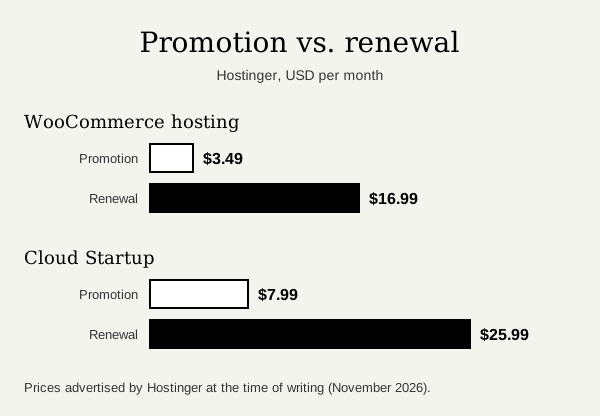
One detail almost nobody checks is the renewal price. For example, at the time of writing, Hostinger advertises its WooCommerce hosting from $3.49 a month when you prepay 48 months, but it renews at $16.99 a month; and its Cloud Startup plan goes from $7.99 to $25.99 a month on renewal. That is normal in the industry, so do your math with the renewal price, not the promotional one.
If your store is already online and running slowly, in why is my WordPress site slow I explain the most common causes, and hosting is one of them.
Plugins and licenses: “free” is not always free
WooCommerce is free, and for many stores free plugins plus a good builder are enough. But some features only exist in paid extensions, and almost all of them renew every year.
One example: if you want to sell subscriptions (a monthly box, a recurring service), the official WooCommerce Subscriptions extension costs $279 a year for one site. On top of that you may add a builder like Elementor Pro or Bricks Builder, a caching plugin, or shipping and invoicing extensions. My advice: install only what the store really needs.
Maintenance: the cost almost nobody budgets for
A store is not finished the day it goes live. WordPress, WooCommerce, the theme and the plugins are updated constantly, and in a store a careless update can break checkout on a Friday night. Maintenance includes tested updates, backups, checking payments with test orders, and small changes.
You can do it yourself if you have the time and some experience, or hire it out. As a reference, a basic plan with updates, backups and a monthly check usually costs $40 – $80 a month; a busier store that needs more support hours or frequent changes can reach $150 or more.
How to request an online store quote you can compare
The more information you give, the more accurate the quote will be. Try to be clear on:
- How many products you will sell at launch and whether they have variations (sizes, colors, dimensions).
- Which payment gateway you want to use, or whether you need help choosing one.
- How you will ship: only in your city, nationwide or abroad too.
- Whether the store needs to connect to e-invoicing, inventory or other tools.
- Whether you have product photos and descriptions, or they need to be created.
- A couple of reference stores you like, and your budget range.
And always ask for the quote to spell out what is and is not included: payments, shipping, taxes, emails, product upload, performance and support after launch. A one-line quote is impossible to compare.
Need help with your store?
If you are about to start selling online or already have a WooCommerce store you want to improve, I can help you from organizing the catalog all the way to launch. I work with a fixed quote split into stages, so from the start you know what your store includes, what it costs and when it will be ready.
You can see what the service includes on WooCommerce development or estimate a rough budget on the pricing page.
Frequently asked questions
How much does a WooCommerce store cost in Ecuador?
The stores I build start at $2,250 and usually fall between $2,250 and $7,200+, depending on the catalog, the design and the integrations. Domain, hosting, licenses, gateway fees and maintenance are separate.
Does WooCommerce charge a monthly fee?
No. WooCommerce is free. What you pay monthly or yearly is hosting, any paid extensions you use and the gateway fees on each sale.
Can I accept payments with Payphone, Datafast or Kushki in WooCommerce?
Yes. All three integrate with WooCommerce. Payphone is the quickest to activate; Datafast and Kushki require a merchant onboarding process.
How long does it take to build an online store?
Usually between 6 and 12 weeks, depending mainly on the size of the catalog and how quickly the products, photos and copy are ready.
Need help with this?


About the author
Learn more about me →